Cronometro Hub
Use casesCamera finishFeaturesPricing
Log in

For every event where time decides the result. Timing and results for sports events
From stopwatch and notebook to professional timing, with just your phone.

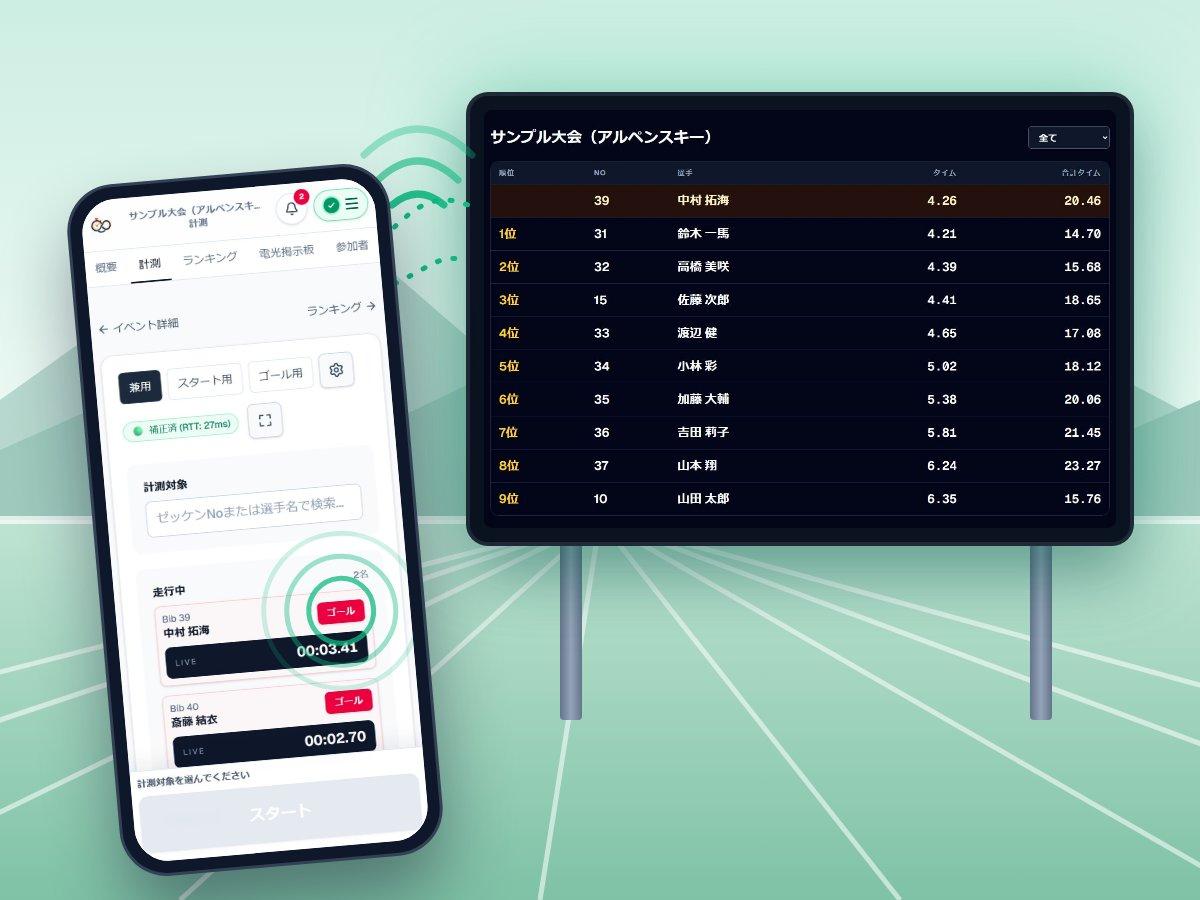
Illustration: a time measured on a smartphone appears right away on a scoreboard display at the venue

Split start and finish across separate phones. A camera can also detect the finish crossing automatically. Times and standings are tallied on the spot and reach athletes and parents by QR code.

  • Ski & snowboard
  • Skating
  • Track & road relay
  • Marathon & running
  • Cycling
  • Rowing & canoe
  • School sports days

Cronometro Hub

Time sports events and publish results from your smartphone.

Service

  • Pricing
  • Events

Legal

  • Legal notice (Specified Commercial Transactions Act)
  • Privacy policy
  • Terms of service

Support

  • Contact

© 2026 【要設定】

  • Club training
  • Browse templates by sport

    • No app to install
    • No dedicated timing equipment
    • No credit card required

    Practice timing through results in the tutorial. No login is required, and practice records stay off the server.

    Plan changes from the screen are not available in the current version. Card payments run in the sandbox (test mode) and are not real charges.

    Illustration: a time measured on a smartphone appears right away on a scoreboard display at the venue

    Where it is used

    From a handful of athletes in practice to hundreds at a meet. Every timing flows straight into the results.

    Club and team training, time trials

    Record every time in ski, skating, track or cycling practice. Rankings by best or two-run total are automatic, and each athlete's progress is kept.

    Plus recommended

    School meets and sports days

    For school marathons and club time trials. Several teachers can split start and finish duty on their own phones.

    Pro recommended

    Local races and time trials

    Bulk registration, a venue scoreboard, instant results and printable certificates. Less work for the organizers.

    Pro / Team recommended

    Coaches and solo practice

    Put a phone at the finish line and you can time alone. Start on the free plan.

    From Free

    Running a race or practice, do any of these sound familiar?

    • Not enough people on the finish line; worried about mis-taps and missed finishes
    • Copying paper records into a computer afterwards is a chore
    • With several timekeepers, the records end up scattered
    • Results take so long that athletes and parents have to wait
    • Dedicated timing equipment is too expensive

    With Cronometro Hub, a smartphone is all you need, from recording to announcing results.

    Good for organizers and athletes alike

    It cuts the work after timing, too.

    Race and event organizers

    Run smoothly even with a small crew

    • Add timekeepers quickly with an invite URL or QR
    • Records stay on the device when offline and are sent automatically when back online
    • Scoreboard, certificates and results from the same screens

    Coaches and teachers

    Practice times become a record of growth

    • Pick the ranking method that fits the goal: best, total, average
    • See each athlete's progress across events in a chart
    • Penalties, dual races and team races are supported

    Athletes and parents

    Results reach your hand on the spot

    • Scan the QR code to see rank and time on your own phone
    • How names are shown can be set per event
    • Your records build up with every event

    Three steps

    1. 1

      Create an event

      Set the name, date and rules. Add participants one by one or in bulk with CSV.

    2. 2

      Time with your phone

      Just tap start and finish. Even when split across several devices, records come together in one place.

    3. 3

      Share results with a QR code

      The ranking updates automatically. Share it by QR code or URL, or show it on a big screen at the venue.

    Right between paper and dedicated equipment

    Leave manual tallying behind without buying expensive equipment.

    Paper and stopwatchDedicated timing equipmentCronometro Hub
    Cost to get startedAlmost nothingHundreds of thousands of yenFree (free plan available)
    SetupMinimalEquipment and wiring requiredJust bring your phones
    Several timekeepersRecords end up scatteredDepends on the number of unitsAdd devices; records stay in one place
    Tallying and rankingCopy and calculate by handDedicated softwareAutomatic (best, total, average and more)
    Sharing resultsWrite and post on paperExtra work neededInstantly on URL, QR and big screens
    Cost to get started
    Paper and stopwatchAlmost nothing
    Dedicated timing equipmentHundreds of thousands of yen
    Cronometro HubFree (free plan available)
    Setup
    Paper and stopwatchMinimal
    Dedicated timing equipmentEquipment and wiring required
    Cronometro HubJust bring your phones
    Several timekeepers
    Paper and stopwatchRecords end up scattered
    Dedicated timing equipmentDepends on the number of units
    Cronometro HubAdd devices; records stay in one place
    Tallying and ranking
    Paper and stopwatchCopy and calculate by hand
    Dedicated timing equipmentDedicated software

    For races that require official results, follow the organizer's rules. We recommend starting alongside your current method at practices and meets.

    What you can do

    1Time

    Practice in the tutorial

    Before you sign up, try creating an event, timing, rankings, and the scoreboard on the same screens as the live app. Practice records stay off the server.

    Camera detects passes automatically

    Point your phone camera at the start or finish line. Passes are timed with no tap delay or mistaken presses. Video is processed on the device and never sent.

    Sync across devices

    Even with separate start and finish devices, records merge in real time.

    Lap timing supported

    Record laps and mid-course passes too, and combine them with camera detection.

    2Run the event

    Works on shaky connections

    If the connection drops, records stay on the device and are resent automatically.

    Catch recording mistakes

    Missing starts are flagged for review, and you can check the action history.

    Bulk participant entry

    Import participants with CSV. Timekeepers join instantly with an invite URL or QR code.

    3Share

    Automatic ranking

    Choose best, total or average. Penalties are added automatically.

    Share results instantly

    Share the ranking by URL and QR code, show it on a big-screen display, and have finishes read aloud.

    Records that build up

    See each athlete's progress across events, and manage athletes together with parents and coaches.
    The real screens

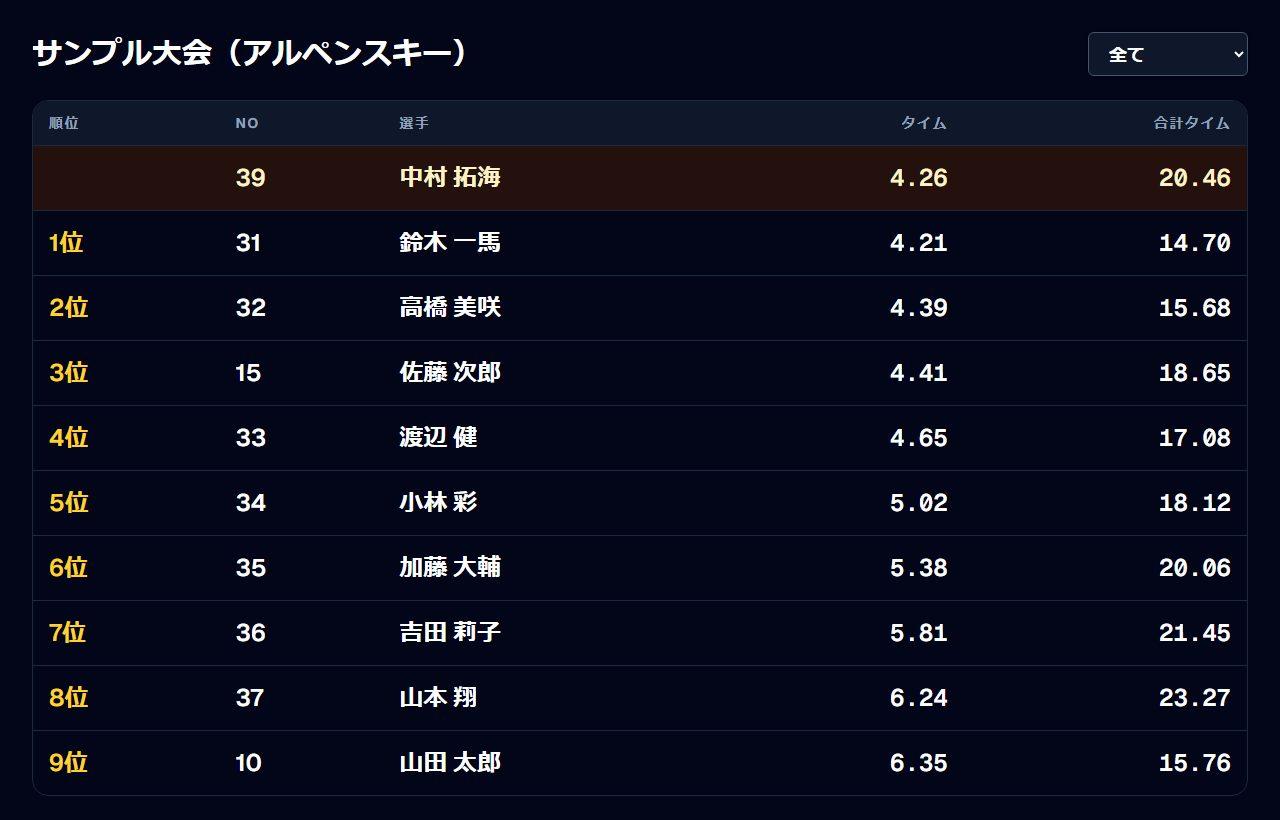
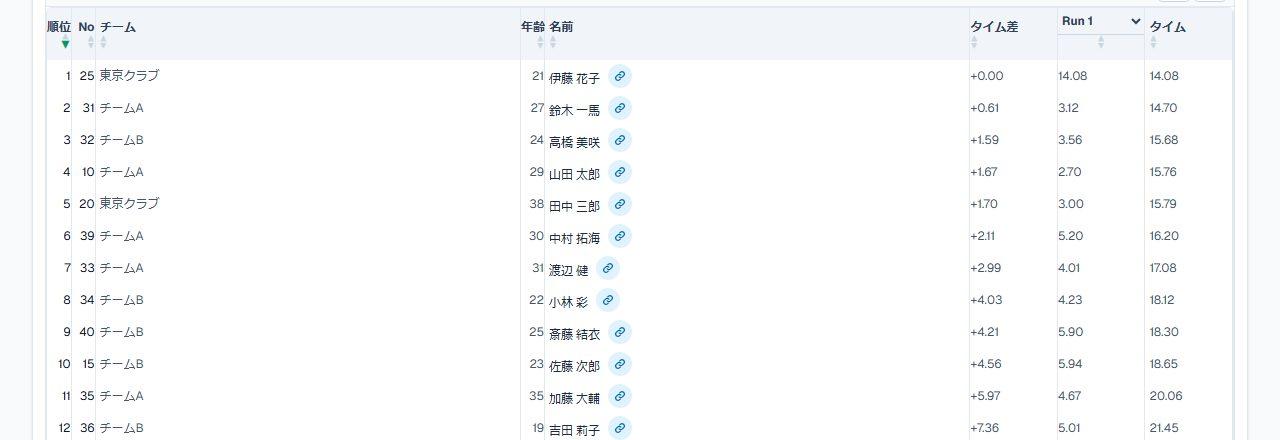
    Screenshot of the ranking screen
    Ranking
    Screenshot of the big-screen display
    Big-screen display
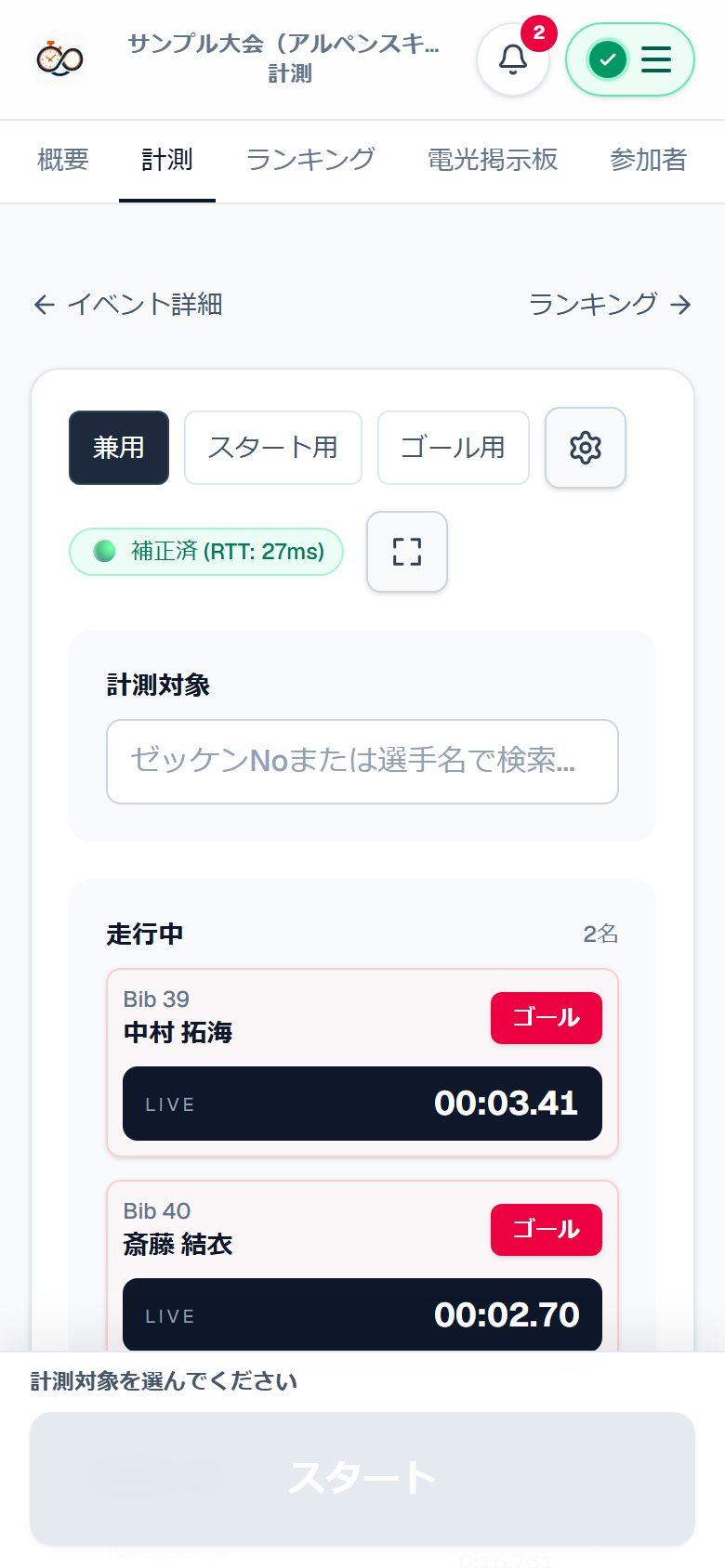
    Screenshot of the timing screen on a smartphone
    Timing

    Screens show demo data.

    Pricing

    Start for free. The amounts below are a price guide.

    Plan changes from the screen are not available in the current version. Card payments run in the sandbox (test mode) and are not real charges.

    Free

    For trying it out

    Free

    • 1 events per month
    • 5 participants per event
    • 10 runs per event
    • 3 lists

    Plus

    For coaches and small clubs

    ¥980

    per month, tax included

    ¥9,800 per year (2 months free)

    • 10 events per month
    • 15 participants per event
    • 150 runs per event
    • 10 lists

    Recommended for clubs and races

    Pro

    For schools, teams and small races

    ¥2,980

    per month, tax included

    ¥29,800 per year (2 months free)

    • 50 events per month
    • 50 participants per event
    • 500 runs per event
    • 30 lists

    Team

    For race organizers and multiple events

    ¥4,980

    per month, tax included

    ¥49,800 per year (2 months free)

    • 100 events per month
    • 500 participants per event
    • Unlimited runs per event
    • 50 lists

    One login can open 3 timing screens at once. There is no limit on how many timekeepers you can invite. There is also no limit on how many timing seats can be active on an event.

    Need it for just one race? Get an Event Pass with no monthly plan (from ¥980 per event).

    See full pricing

    FAQ

    Can I really time with only a smartphone?
    Yes. It runs in the browser, so there is nothing to install. Each device's clock is corrected against the server time when recording.
    Is there a free plan?
    Yes. The free plan has limits on events and participants but no time limit. You can also try it for 5 minutes without signing up.
    How many devices can time at once?
    One login can open 3 timing screens at once, including trial and Free. One person can use several devices, such as a start phone and a finish phone. Someone else should time with their own account as a timekeeper. There is no limit on how many timekeepers you can invite. There is also no limit on how many timing seats can be active on an event. Load is bounded by the run limit for the event.
    How accurate is camera detection?
    It uses the device camera to detect the moment someone crosses the line, so there is no tap delay and results are consistent. Sensitivity and frequency can be tuned in the settings to suit camera position and lighting. Video is processed on the device and is not sent to the server.
    What happens if the connection drops?
    Actions are saved on the device and resent automatically once the connection recovers, including when the server is briefly unavailable.
    Is athletes' information safe?
    For each event you can choose public, unlisted or private, and who can see names. See the privacy policy for details.
    Can I use it for an actual race?
    Yes. The Team plan supports up to 500 participants and unlimited runs. If it is your first time, we recommend trying it at a practice or meet and checking the venue's connection first. For races that require official results, follow the organizer's rules.
    Can I cancel a paid plan at any time?
    In the current version you cannot change or cancel a plan from the screen. Card payments run in the sandbox (test mode) and are not real charges.

    Try it for 5 minutes.

    No signup and nothing to install. If you like it, start for free.

    Finish line
    Timing

    GOAL

    12.34 s

    Before

    Cronometro Hub
    Automatic (best, total, average and more)
    Sharing results
    Paper and stopwatchWrite and post on paper
    Dedicated timing equipmentExtra work needed
    Cronometro HubInstantly on URL, QR and big screens

    Crossing

    After

    An illustration. In the real screen you can review the three captured frames on the timing screen.

    Camera finish detection

    The camera never misses the finish.

    Just point your phone camera at the finish line. The time is fixed the instant an athlete crosses it. No one needs to press a button, and there are no mis-taps.

    • No tap delay, no misses or wrong presses
    • The crossing moment and the frames before and after are kept, so you can check close finishes
    • Video is processed on the device and never sent to a server
    • A lightweight setting keeps it stable even on low-powered devices
    Try it in the tutorial